Overview
By 30th of June 2026, the Australian Taxation Office (ATO) requires employers to nominate and authorise the Sending Service Provider (SSP) used to lodge their Single Touch Payroll (STP) reports.
This is an ATO requirement, not a Saasu requirement. It helps ensure that only authorised payroll software and sending services can submit STP information to the ATO on your behalf.
With STP, there can be a few different parties involved.
Sending Service Provider (SSP)
The SSP securely sends STP reports to the ATO. Saasu uses Oban Solutions (OBAN PTY LTD, ABN: 18 163 365 080) as our partnered SSP for STP lodgements.
Digital Service Provider (DSP)
The DSP is the payroll software provider. In this case, Saasu is the DSP.
Employer / Payroll Administrator
The employer, tax agent, or payroll administrator using Saasu for STP must authorise Oban Solutions in ATO Access Manager using the SSID provided in Saasu.
How to nominate the SSP in ATO Access Manager
For Saasu STP lodgements, Saasu uses Oban Solutions as our partnered Sending Service Provider.
Before you begin
You will need:
SSP Name: OBAN PTY LTD
Oban ABN: 18 163 365 080
Software ID / SSID: Available in Saasu under File Settings > ATO SSID
An authorised person for the business will need to complete the nomination in ATO Access Manager.
Steps in Saasu
First, retrieve your SSID from Saasu.
These steps are required for STP lodgements to the ATO. If they are not completed, you may still be able to use payroll in Saasu, but STP submission/lodgement will not be available.
- Ensure you are logged in as a user with Full File Access and Payroll Access.
Read-only access is not sufficient. - Go to File Settings > ATO SSID.
- If an SSID is already shown, copy the SSID.
- If no SSID is shown, select Register SSID.
- Once the SSID is populated, copy the SSID and continue with the ATO Access Manager steps below.
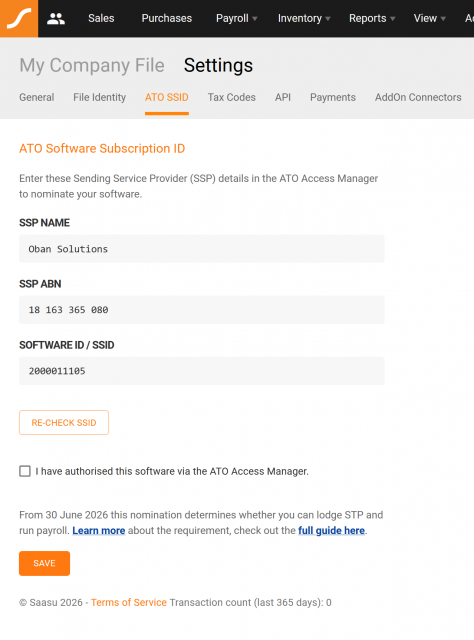
ATO SSID Registered Showing SSID
Steps in ATO Access Manager
Log in to ATO Access Manager.
Select My hosted software services.
Select Notify the ATO of your hosted service.
Search for the SSP by name or ABN.
Select the ABN link for Oban PTY LTD.
Enter the software ID provided by Saasu.
Select Next.
Review the details and select Save.
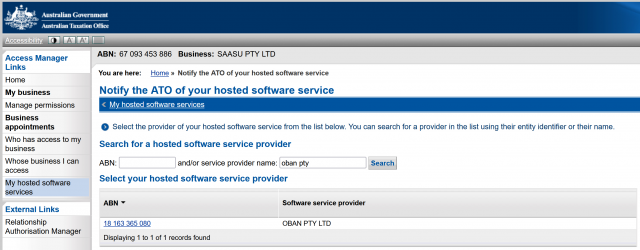
ATO Access Manager
Final Step in Saasu
After completing the nomination in ATO Access Manager
- Rreturn to File Settings > ATO SSID in Saasu.
- Tick “I have authorised this software via the ATO Access Manager”, then select Save.
Once completed, Oban PTY LTD will be authorised to send STP information for your business to the ATO through Saasu.
No further action is required unless you change payroll software, use another payroll provider, or need to update your nomination.
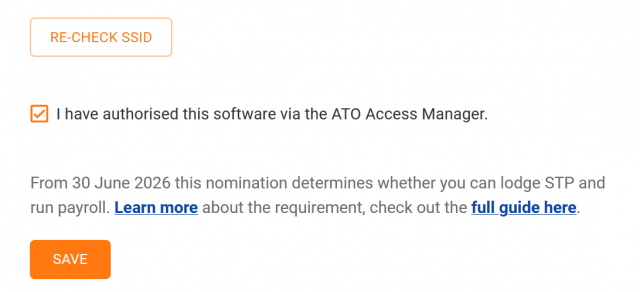
ATO SSID Acknowledgement
More information from the ATO
Employers using payroll software that lodges STP through an SSP must notify the ATO of the SSP’s Software ID by 30 June 2026. This only needs to be completed once for each payroll software subscription, unless you change providers or use more than one provider.
For more information, see the ATO guides here: